Drone Topographic Survey Software | Contours, DSM & DTM
Drone topographic survey software for DSM, DTM, contours at any interval, cross-sections and CAD exports. Contour and profile tools on Professional, $69/month.
Drone Topographic Survey Software | Contours, DSM & DTM
Drone topographic survey software for DSM, DTM, contours at any interval, cross-sections and CAD exports. Contour and profile tools on Professional, $69/month.
Table Of Content
- Drone Topographic Survey Software, End to End
- DSM and DTM: The Two Surfaces of a Topographic Survey
- Contours at Any Interval
- Cross-Sections and Elevation Profiles
- Spot Heights, Grid Points and Measurements
- Ground Control and Accuracy Reporting
- Overlay Your Design Files
- Exports for CAD and GIS
- Topographic Surveys Over Time
- Pricing
- Frequently Asked Questions

By Ranjan Suman, Co-Founder & Director
7 min read · Updated
Processing a typical 400-image survey into an orthomosaic, DSM and DTM costs about $20 on Aeroyantra (8 credits at $2.50, $0 to start). Contour and cross-section exports, volumes and design overlays are on Professional at $69/month with 40 credits included.
Drone Topographic Survey Software, End to End
A topographic survey needs elevation you can design on: a bare-earth surface, contours at the interval your drawings use, spot heights, sections along an alignment, and files your CAD software opens without rework. Drone topographic survey software has to produce all of that from photographs, and prove the accuracy.
Aeroyantra processes drone images in the cloud into a DSM, a DTM, an orthomosaic and a point cloud, then lets you generate contours, elevation grid points and cross-sections in the browser and export them for AutoCAD Civil 3D, Bentley OpenRoads, ArcGIS, QGIS and Global Mapper. No workstation, no seat licences.
DSM and DTM: The Two Surfaces of a Topographic Survey
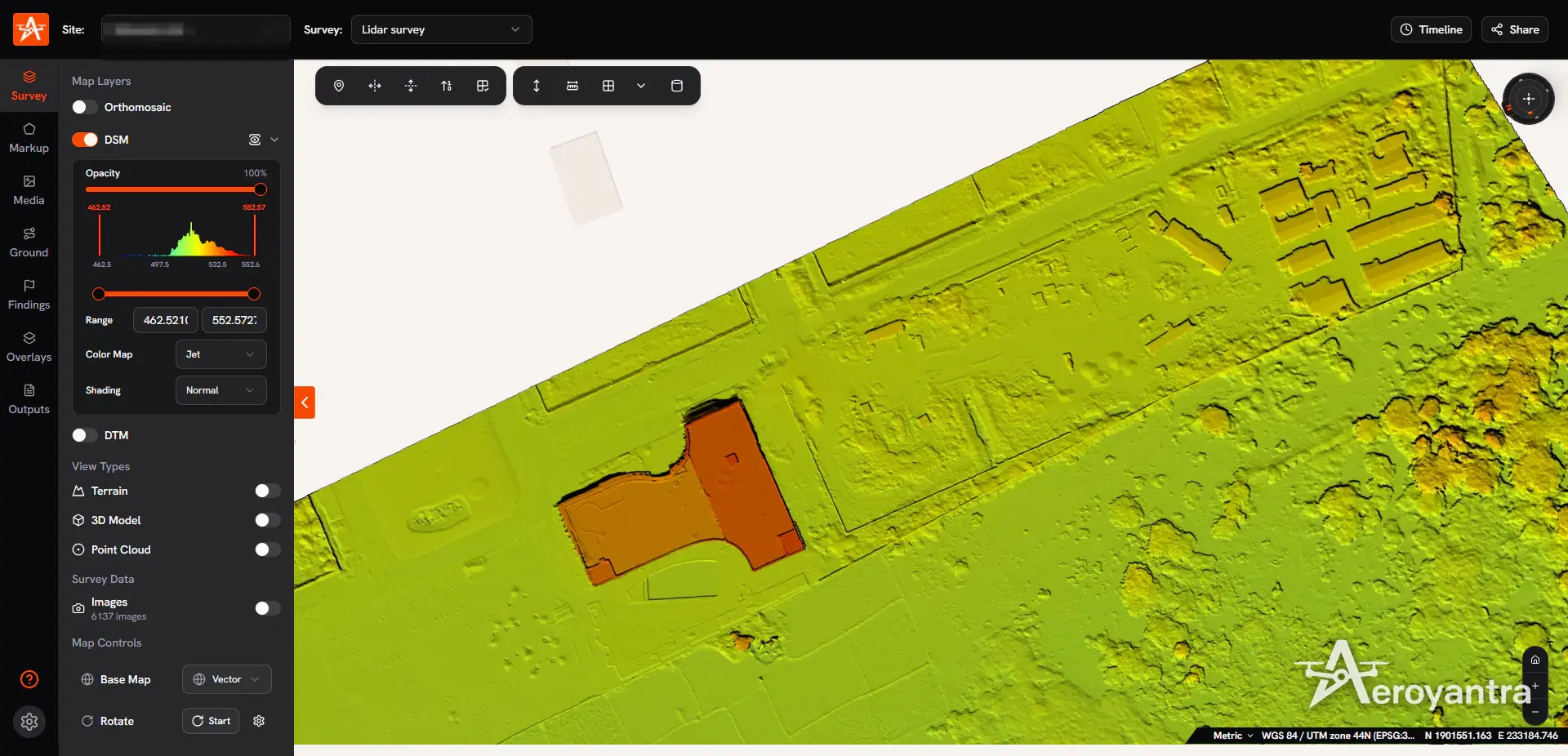
Every processed survey produces both elevation models as GeoTIFFs:
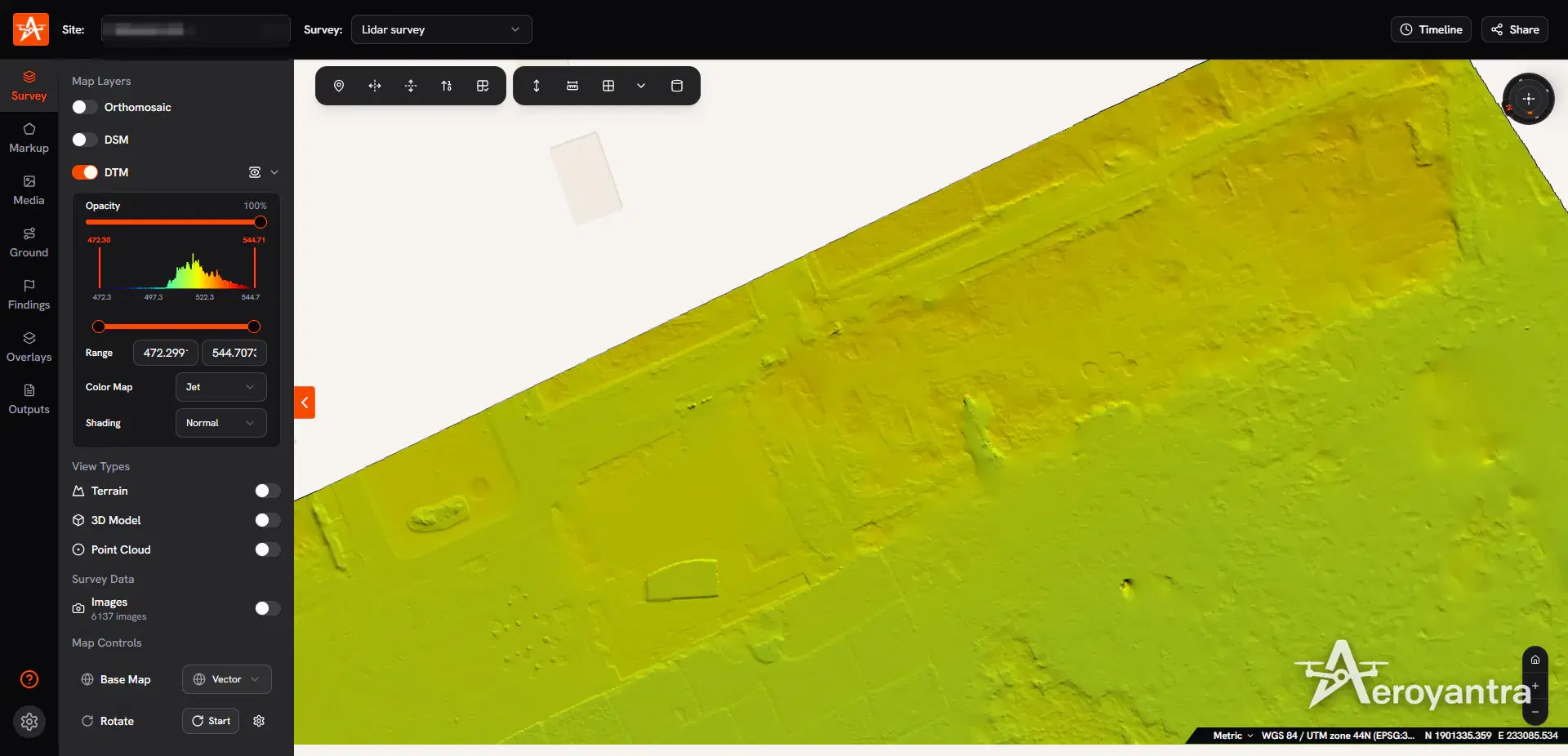
- Digital Surface Model (DSM) - the elevation of the first surface the drone sees: roofs, trees, vehicles, stockpiles. Use it for volumes of material on the ground and for anything that must include structures.
- Digital Terrain Model (DTM) - the bare-earth surface with those objects removed. Use it for design, drainage, road and platform levels, and earthwork.
On open construction and mining sites the two are close. On vegetated land they diverge, and if bare earth under canopy matters, LiDAR is the better capture method - see drone LiDAR mapping and the LiDAR vs photogrammetry comparison.
Contours at Any Interval
Contours are where most topographic deliverables start, so Aeroyantra gives you two ways to work with them:
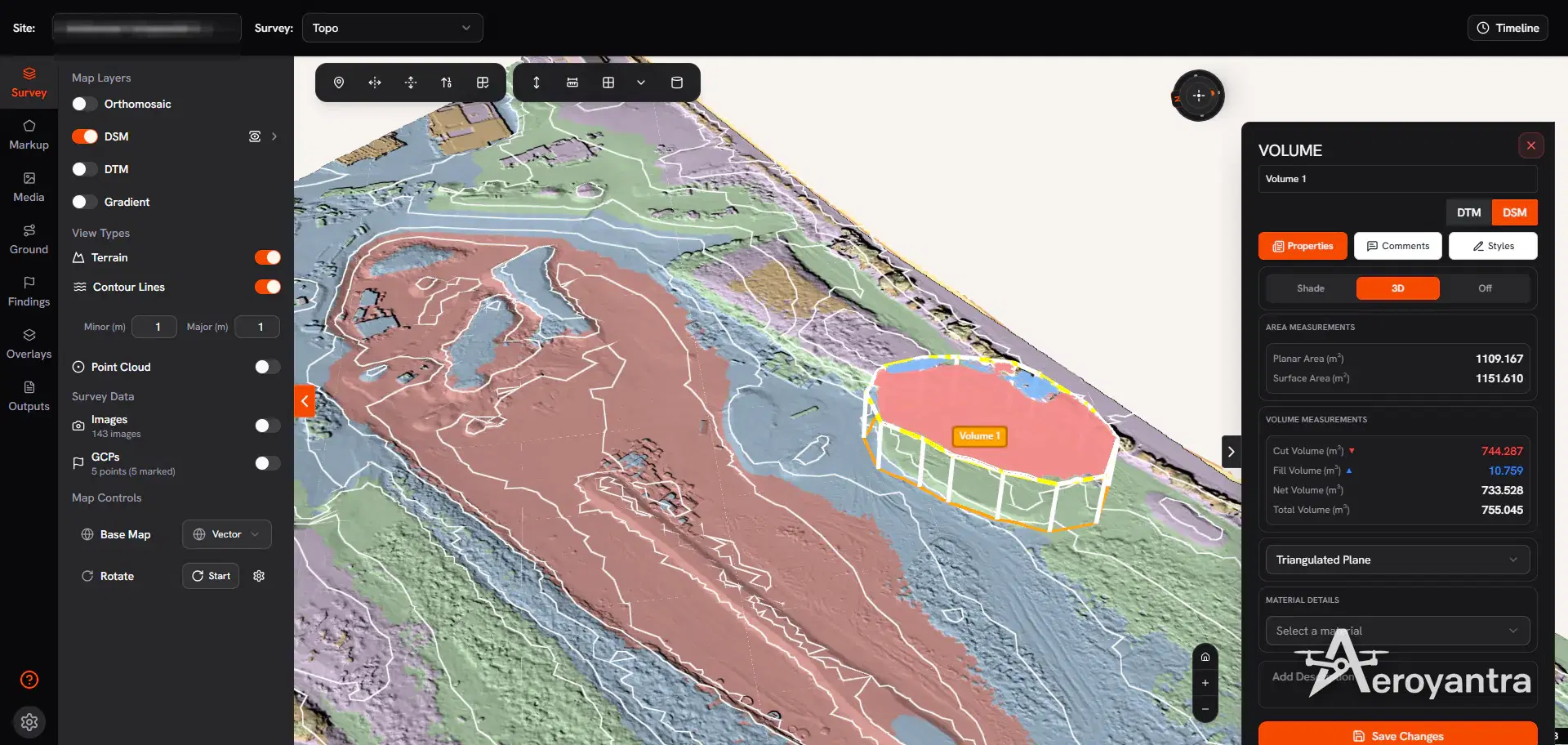
- Live contour lines on the map, with separate minor and major intervals, to read the terrain while you inspect the site.
- Generated contour outputs at any interval you type, with an optional major interval, a choice of simplification, the DSM or DTM as the source surface, and the output projection - including a custom EPSG code to match your project drawings. Contours download for use in CAD and GIS.
Pick the interval from the use: tight intervals for platform levels and drainage on flat sites, wider ones for hilly terrain where tight contours become unreadable.
Cross-Sections and Elevation Profiles
Draw any line on the map and switch on the cross-section to see the elevation profile along it. Profiles export as a package of CSV, DXF, KML and PDF, so the same section can go into a spreadsheet, a CAD drawing, a GIS layer and a client report.
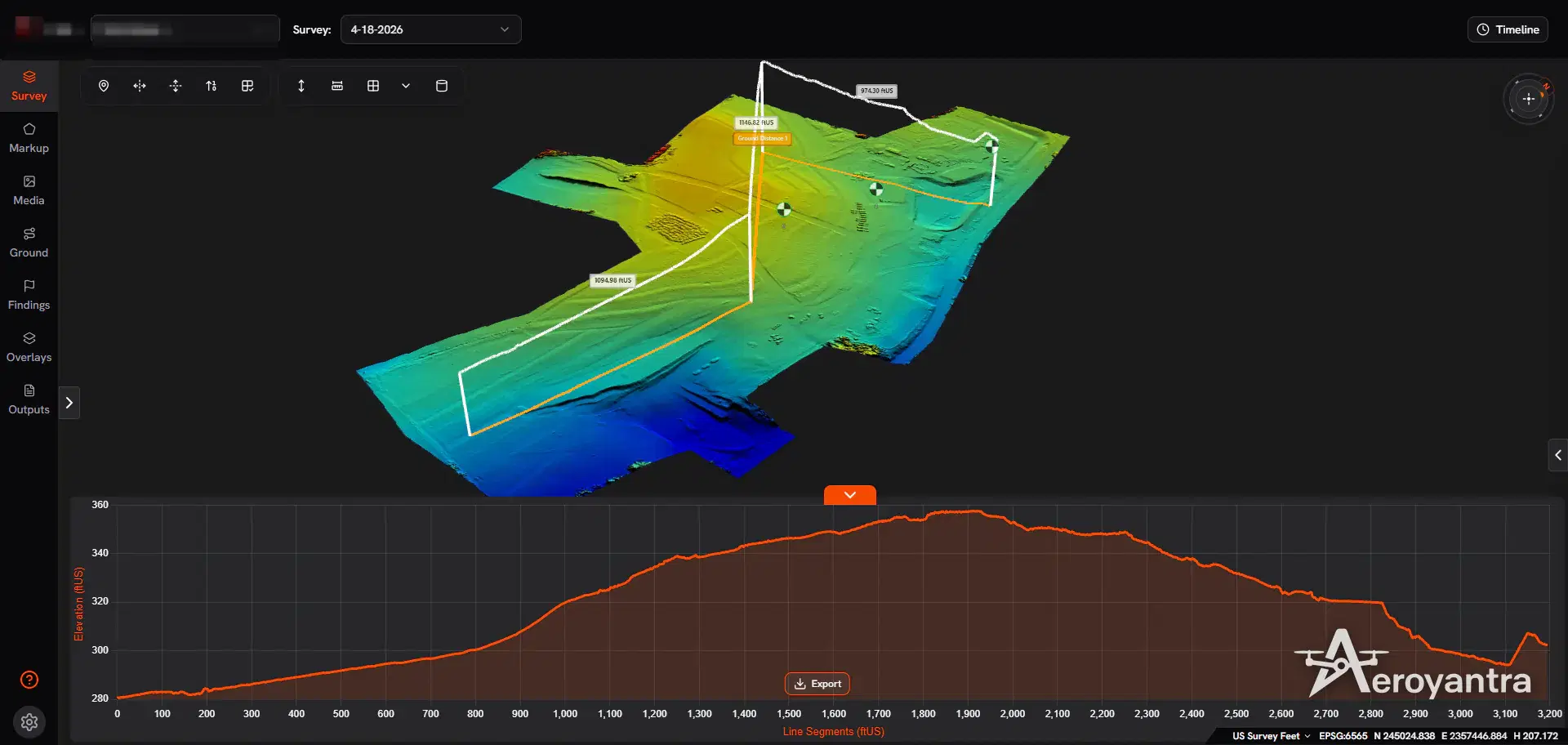
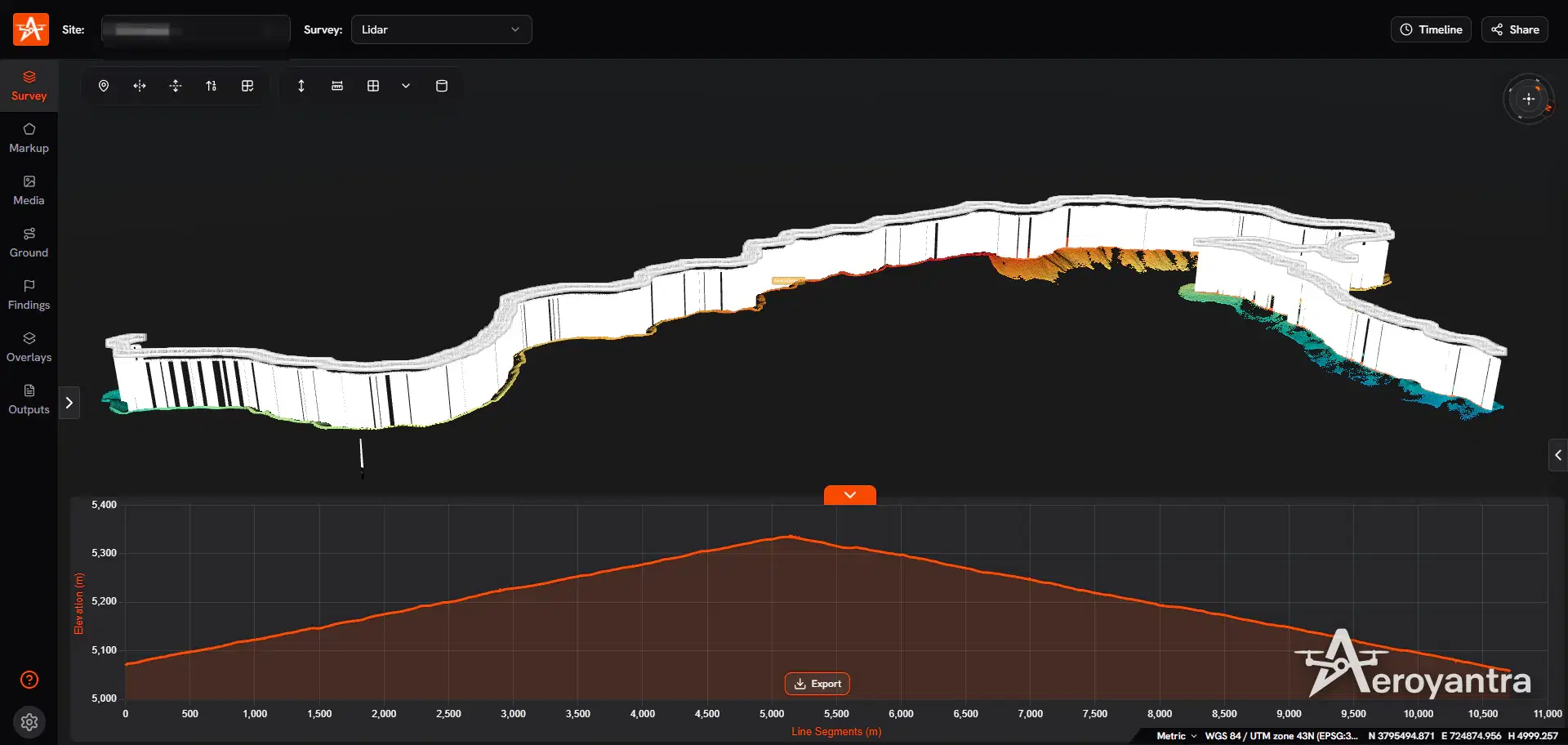
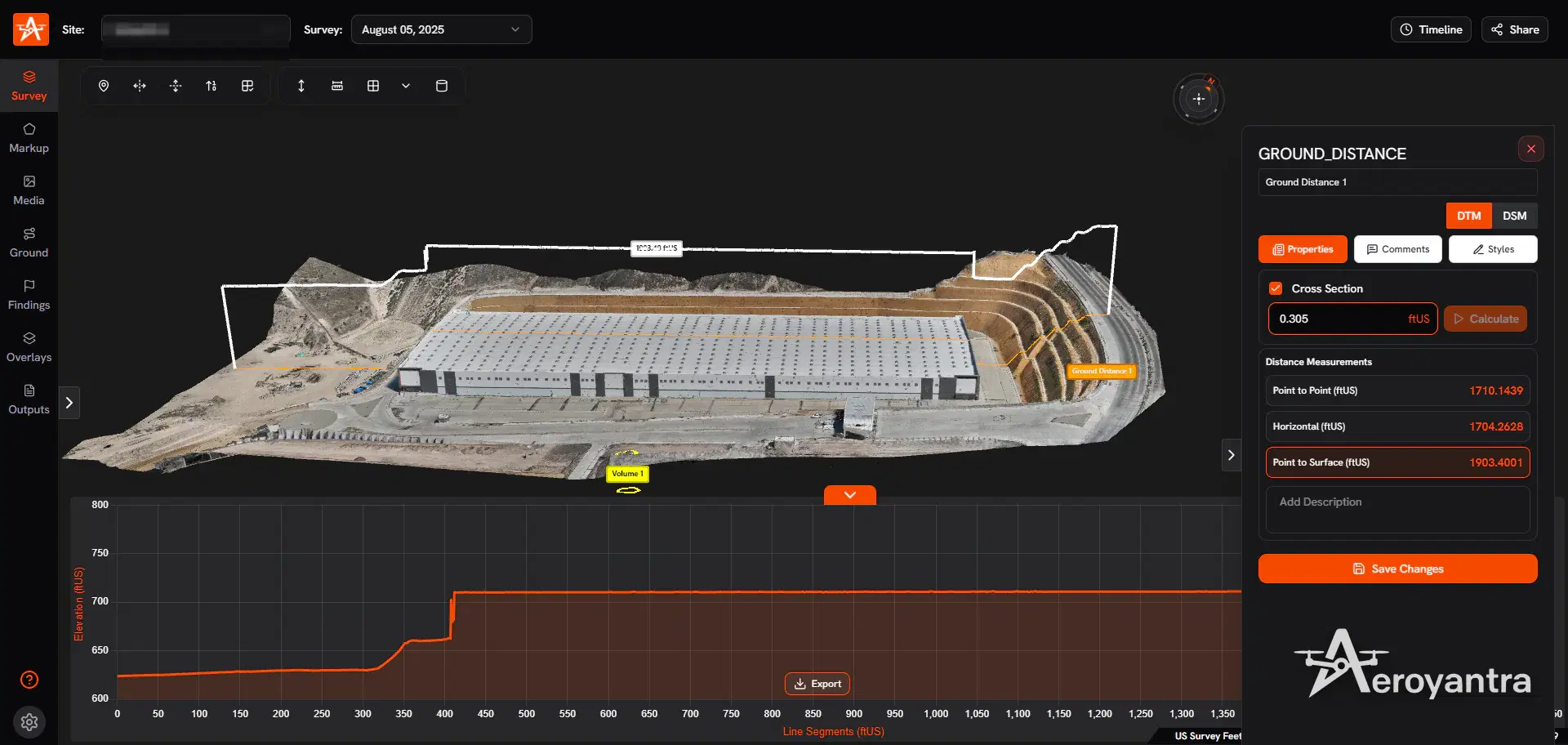
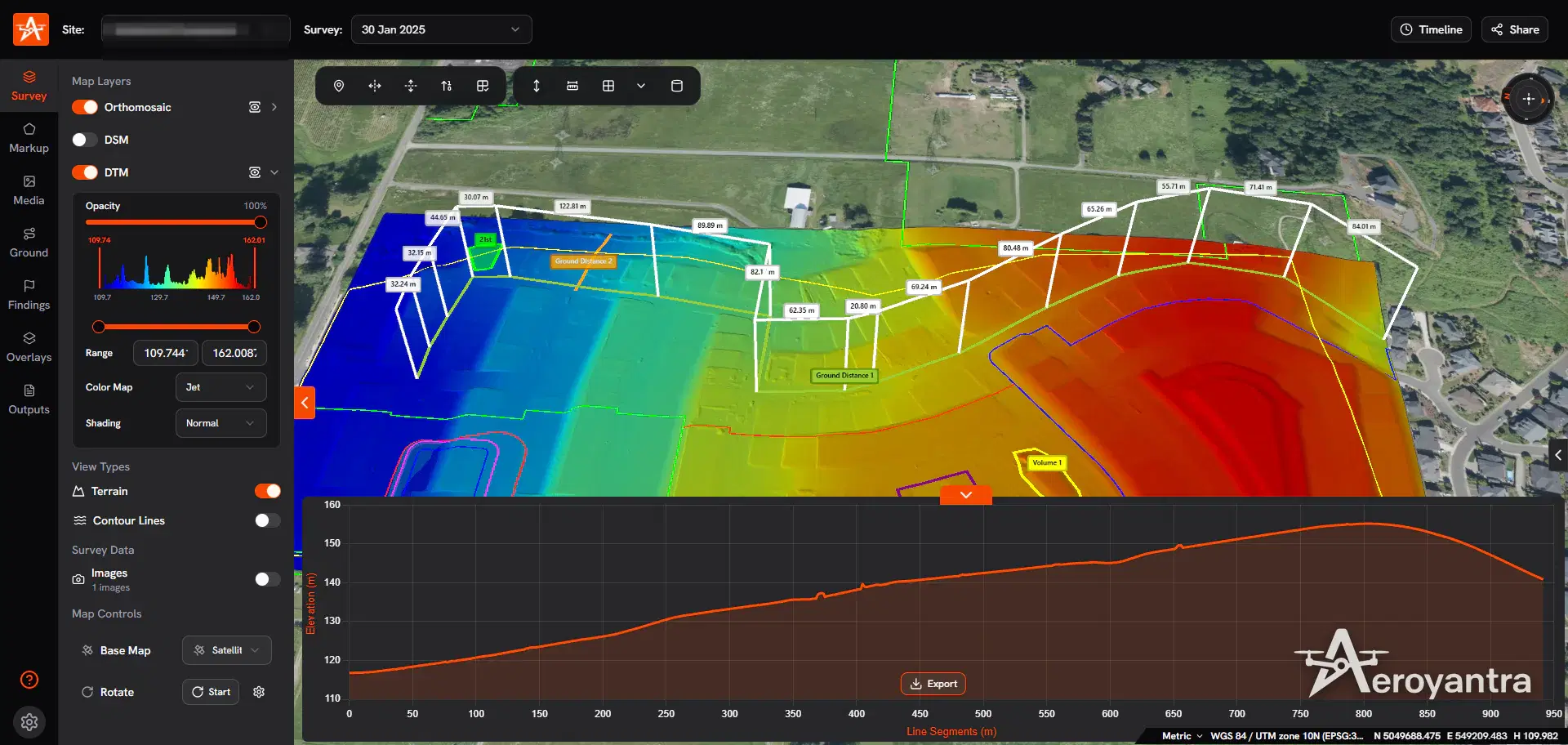
For corridor work - roads, rail, canals - cut sections at regular chainage along the alignment and export them together. The road survey service and rail and linear infrastructure pages show how this is used on live projects in India.
Spot Heights, Grid Points and Measurements
- Elevation grid points - generate a regular grid of spot heights across the site for design software that wants points rather than surfaces.
- Ground Elevation and Structure Point - read the elevation at any location, on the terrain or on a structure.
- Ground Distance, Straight Line and Vertical Height - slope distance along the terrain, straight-line distance, and height differences.
- Area - planar and surface area for polygons, circles and rectangles.
- Volume - cut, fill, net and total volume against a best-fit plane, a triangulated plane, a custom reference level, or a previous survey of the same site.
Measurements export as KML, DXF, CSV, GeoJSON, SHP, GPKG or PDF.
Ground Control and Accuracy Reporting
Topographic deliverables are only as good as their control. Import ground control points and check points from a CSV with column mapping, mark them on the photos, and every project produces a GCP quality report with X, Y, Z and 3D error per point and RMSE for the project, exportable as PDF or CSV.
With RTK or PPK georeferencing and properly deployed ground control, Aeroyantra achieves 2-3 cm horizontal accuracy. The RTK vs PPK vs GCP guide explains how to choose a georeferencing method, and the GCP placement guide covers where to put the points.
Overlay Your Design Files
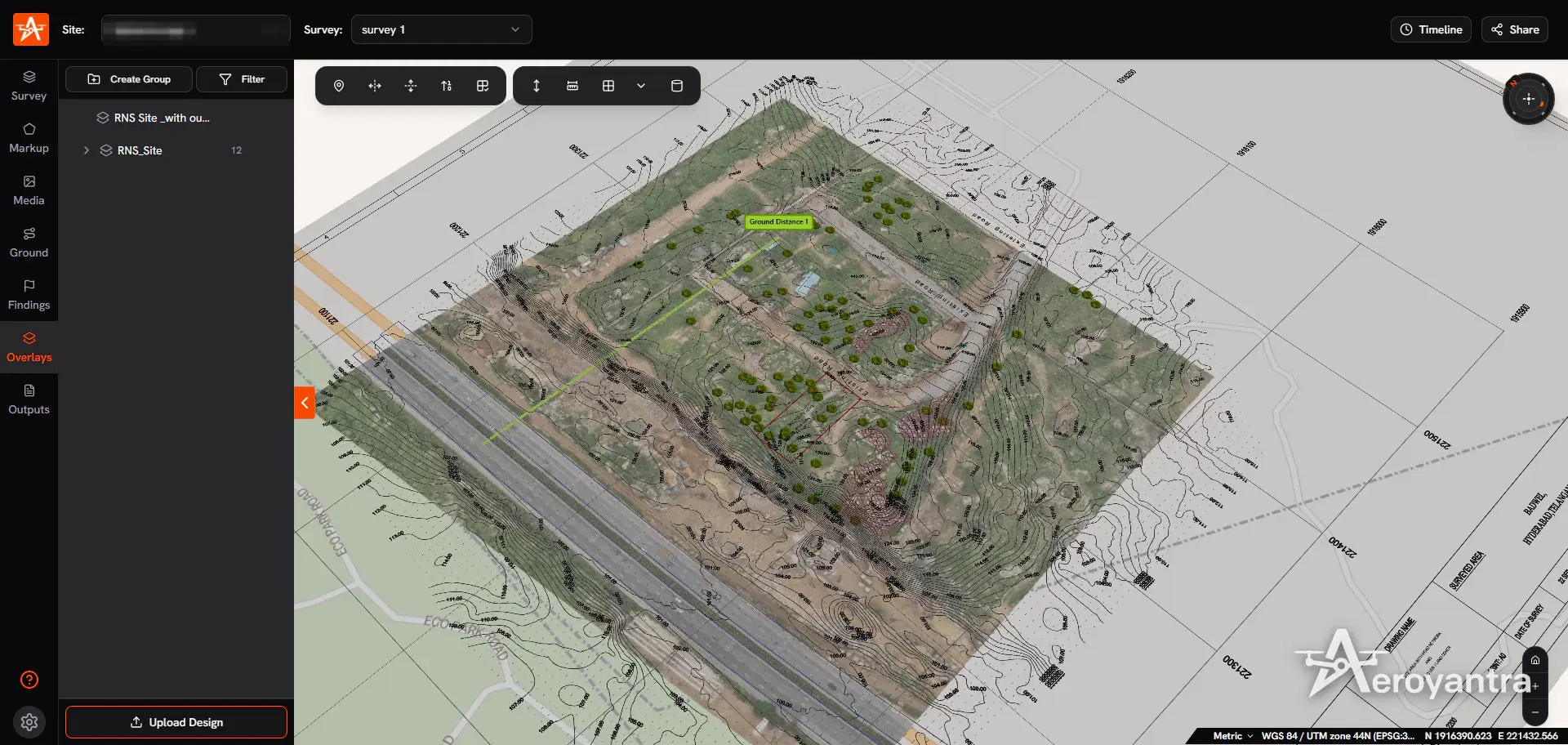
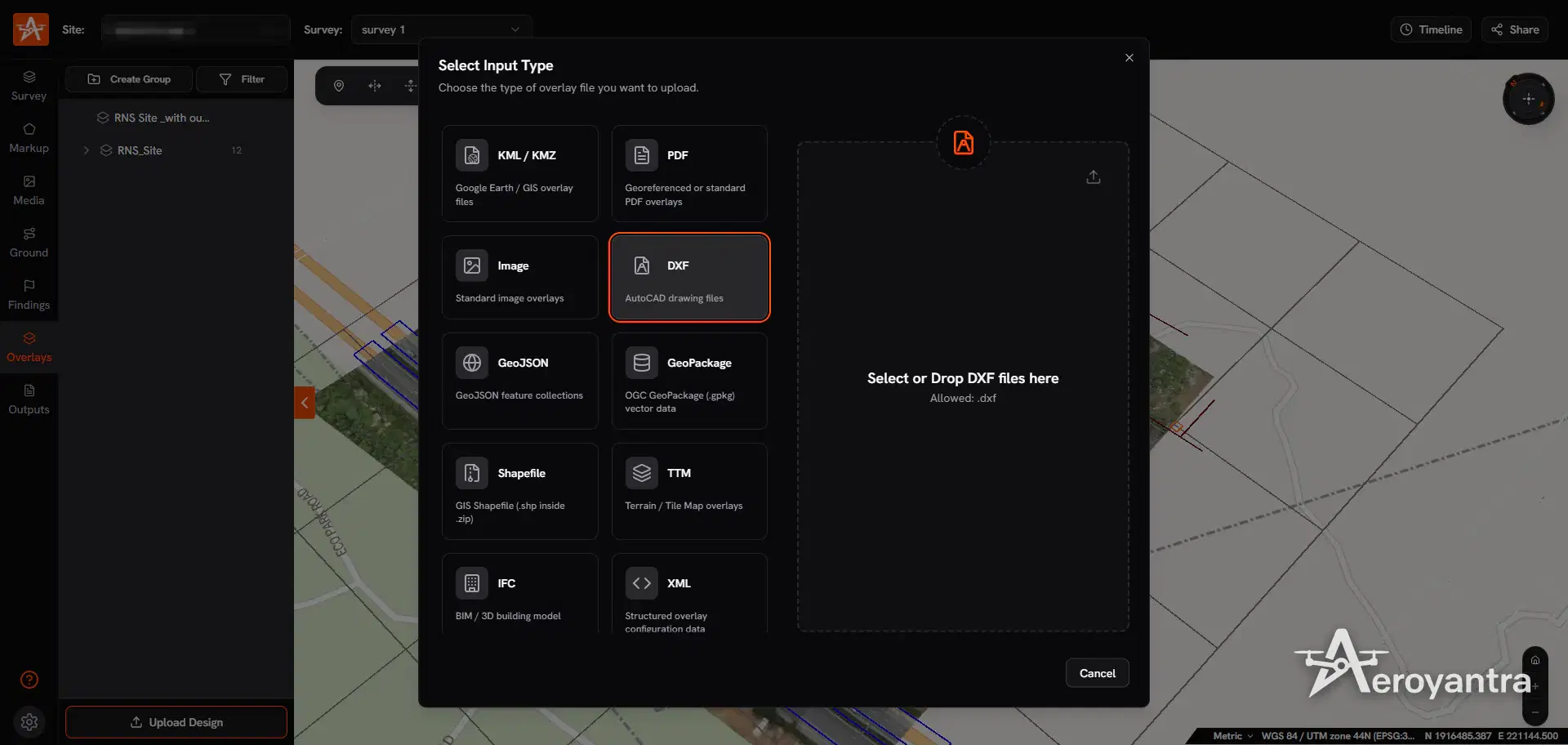
Load existing drawings over the survey to check them against current ground: DXF, LandXML, TTM, Shapefile, GeoJSON, GeoPackage, KML/KMZ, PDF, images and IFC. Overlays can be offset vertically, clamped to the ground, and converted into measurements.
Exports for CAD and GIS
| Output | Formats |
|---|---|
| Orthomosaic | GeoTIFF, PNG (with world files) |
| DSM and DTM | GeoTIFF, plus colourised versions |
| Point cloud | LAZ |
| 3D model (optional add-on) | OBJ, GLB, 3D Tiles |
| Contours and grid points | Generated outputs, downloaded as a package |
| Cross-sections | CSV, DXF, KML, PDF |
| Measurements | KML, DXF, CSV, GeoJSON, SHP, GPKG, PDF |
These import into AutoCAD Civil 3D, Bentley OpenRoads, ArcGIS, QGIS, Global Mapper and common mine planning packages.
Topographic Surveys Over Time
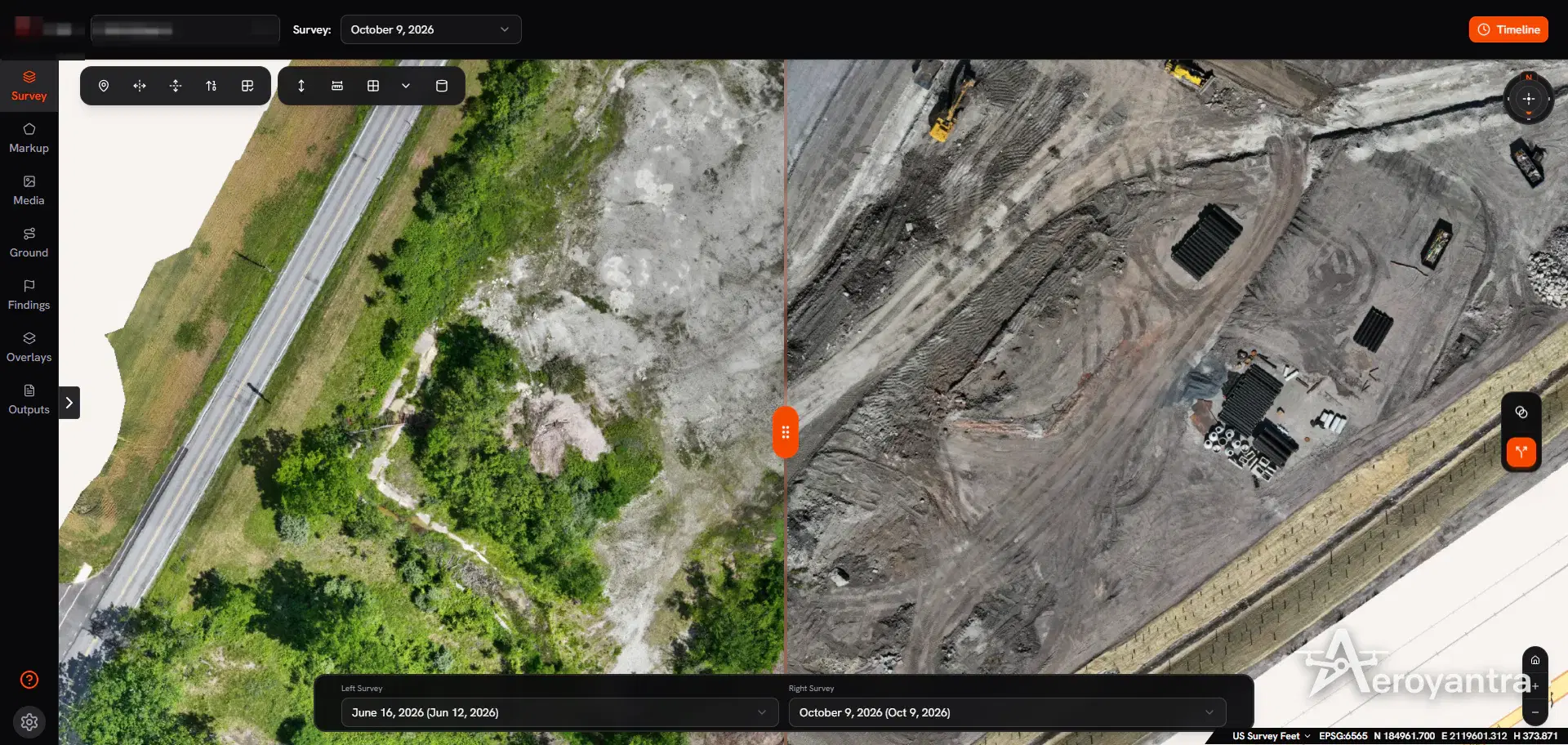
Topography changes on every active site. Fly the same plan each visit and Aeroyantra keeps the surveys on one site timeline, with blend and split-screen comparison of the orthomosaics and survey-to-survey volume calculation for the material moved between dates.
Pricing
Aeroyantra charges for data processed, not for seats: $0 to start, $2.50 per credit (one credit is one gigapixel), falling to $1.67 per credit at volume, or $69/month on Professional with 40 credits included and extra credits at $2.25. A typical 400-image survey from a 20 MP drone is 8 credits - about $20. Basic covers processing, the orthomosaic, DSM/DTM and 3D views; the tools on this page - contour and cross-section exports, elevation profiles, measurements, volumes and design overlays - are part of Professional. See pricing, the supported drones and cameras list, and how this compares in the best drone mapping software guide.
Need the survey flown in India? Aeroyantra's DGCA-certified teams run drone topographic surveys with DGPS ground control and deliver in 24-48 hours.
Frequently Asked Questions
What is drone topographic survey software?
Drone topographic survey software processes overlapping drone photos into the elevation products a topographic survey needs: a digital surface model, a bare-earth digital terrain model, contours, spot heights and cross-sections, exported for CAD and GIS. Aeroyantra does this in the cloud and lets you generate contours and profiles in the browser.
Can drone survey software generate contours?
Yes, on the Professional plan. Aeroyantra shows live contour lines with adjustable minor and major intervals while you inspect the site, and generates contour outputs at any interval you specify, from either the DSM or the DTM, in a projection of your choice including custom EPSG codes.
What is the difference between a DSM and a DTM?
A digital surface model (DSM) records the elevation of everything the drone sees, including buildings, vehicles and vegetation. A digital terrain model (DTM) removes those to represent the bare ground, which is the surface used for design, drainage and earthwork. Aeroyantra produces both as GeoTIFFs from every processed survey.
Can I export a drone topographic survey to AutoCAD Civil 3D?
Yes. On the Professional plan, Aeroyantra exports DSM and DTM as GeoTIFF, point clouds as LAZ, and contours, cross-sections and measurements in CAD and GIS formats including DXF, SHP and KML, which import into AutoCAD Civil 3D, Bentley OpenRoads, ArcGIS, QGIS and Global Mapper.
How accurate is a drone topographic survey?
With RTK or PPK georeferencing and properly deployed ground control, Aeroyantra achieves 2-3 cm horizontal accuracy. Vertical accuracy benefits most from ground control points, and Aeroyantra's GCP quality report states the RMSE in X, Y and Z for every project.
Process Your Next Survey on Aeroyantra
Upload drone images from any browser and get orthomosaics, DSM/DTM and point clouds back - with optional 3D models and Professional measurement tools - without a workstation or seat licences.
$0 to start, then $2.50 per credit. Professional is $69/month.
Keep exploring
Related services, platform features and guides
- Platform featureRTK Drone Mapping: RTK vs PPK vs GCP Accuracy GuideHow RTK, PPK and ground control set drone mapping accuracy, when you still need GCPs, and how Aeroyantra reports check-point RMSE. From $2.50 per credit.Read more
- Platform featureDrone 3D Mapping Software | Point Clouds and 3D ModelsDrone 3D mapping software that turns photos into point clouds and textured 3D models in your browser. From $2.50 per credit; measurement tools on Professional.Read more
- Survey serviceTopographic SurveyTerrain mapping with survey-grade accuracyRead more
- Technical guideGCP Placement Guide for Survey-Grade AccuracyUse 5-10 ground control points: one near each corner, one central, spread in elevation. Keep a third as check points for 2-3 cm horizontal accuracy.Read more
- ArticleDrone Survey vs Total Station: Full ComparisonDrone survey vs total station compared on accuracy, speed, cost, and terrain. When to use each for land, mining, and construction survey projects.Read more
- GuideDrone Mapping: How It Works, Outputs, Software and CostWhat drone mapping is, how photos become orthomosaics, DSM/DTM, contours and 3D models, which drones and software to use, and what it costs in 2026.Read more